Wednesday, August 30, 2017
Tuesday, August 22, 2017
Machine learning
Machine learning is an application of artificial intelligence (AI) that provides systems the ability to automatically learn and improve from experience without being explicitly programmed. Machine learning focuses on the development of computer programs that can access data and use it learn for themselves.
For More Details
https://www.codeproject.com/Articles/1196024/Machine-Learning-Gradient-Descent
Friday, August 18, 2017
MFC Concepts for Preparation
MFC Concepts
Visual Studio 2015

The new home for Visual Studio documentation is Visual Studio 2017 Documentation on docs.microsoft.com.
The latest version of this topic can be found at MFC Concepts.
This section provides conceptual and task-based topics to help you program using the Microsoft Foundation Class (MFC) Library.
General MFC Topics
Discusses the technical details of the MFC Library.
Discusses the technical details of the MFC Library.
Collections
Discusses collection classes created from and not created from C++ templates.
Discusses collection classes created from and not created from C++ templates.
Date and Time
Provides links to topics discussing using date and time with MFC.
Provides links to topics discussing using date and time with MFC.
Memory Management (MFC)
Describes how to take advantage of the general-purpose services related to memory management.
Describes how to take advantage of the general-purpose services related to memory management.
Message Handling and Mapping
Describes how messages and commands are processed by the MFC framework and how to connect them to their handler functions.
Describes how messages and commands are processed by the MFC framework and how to connect them to their handler functions.
Serialization
Explains the serialization mechanism provided to allow objects to persist between runs of your program.
Explains the serialization mechanism provided to allow objects to persist between runs of your program.
Unicode
Describes MFC support for the Unicode standard for encoding wide characters on Windows NT, Windows 2000, and Windows XP platforms.
Describes MFC support for the Unicode standard for encoding wide characters on Windows NT, Windows 2000, and Windows XP platforms.
Exception Handling (MFC)
Explains the exception-handling mechanisms available in MFC.
Explains the exception-handling mechanisms available in MFC.
MFC Internet Programming Basics
Discusses the MFC classes that support Internet programming.
Discusses the MFC classes that support Internet programming.
MFC Internet Programming Tasks
Discusses how to add Internet support to your applications.
Discusses how to add Internet support to your applications.
MFC COM
Discusses a subset of MFC, which is designed to support COM, while most of the Active Template Library (ATL) is designed for COM programming.
Discusses a subset of MFC, which is designed to support COM, while most of the Active Template Library (ATL) is designed for COM programming.
Multithreading with C++ and MFC
Describes what processes and threads are and discusses the MFC approach to multithreading.
Describes what processes and threads are and discusses the MFC approach to multithreading.
Windows Sockets in MFC
Covers the MFC implementation of Windows Sockets.
Covers the MFC implementation of Windows Sockets.
MFC Reference
Provides reference material for the MFC Library, a set of classes that constitute an application framework, which is the framework of an application written for the Windows API.
Provides reference material for the MFC Library, a set of classes that constitute an application framework, which is the framework of an application written for the Windows API.
MFC Samples
Provides links to samples that show how to use MFC in desktop applications, DLLs, database applications, controls, Web applications, and more.
Provides links to samples that show how to use MFC in desktop applications, DLLs, database applications, controls, Web applications, and more.
For More Please refer the link : https://msdn.microsoft.com/en-us/library/kkcb3t0w.aspx
Friday, July 14, 2017
What i s a Function Pointer ?
A function pointer is a variable that stores the address of a function that can later be called through that function pointer. This is useful because functions encapsulate behavior.
Declaring a Pointer to a Function
Declaration of pointers to functions resembles other declarations. For example, just as we write
int *p;
to say that *p has type int and implying that p is a pointer, we may write
int (*pf)(int);
to say that if we dereference pf, and call it with an int argument, the result has type int. By implication, pf is a pointer to a function that takes an int argument and returns an int result.
A pointer to a function is similar to a pointer to data but it should always be enclosed in parenthesis when using the dereference operator (*) to avoid an compilation error. It then be followed by another parenthesis containing any arguments to be passed to the function when using the *.
Because all that we can do with a function is to take its address or call it, any use of a function that is not a call is assumed to be taking its address, even without an explicit &.
Suppose we have a function with the following prototype:
int f(int); //prototype
Note that it look just like our declaration of pointer to a function:
int (*pf)(int);
Because f is a function, so is (*pf). And if (*pf) is a function, then pf must be a pointer to a function.
The declaration requires the parentheses around *pf to provide the proper operator precedence. Parentheses have a higher precedence than the * operator, so *pf(int) means pf() is a function that returns a pointer while (*pf)(int) means pf is a pointer to a function.
int (*pf)(int); // pf points to a function that returns int
int *pf(int); // pf() is a function that returns a pointer to int
Once we declare pf properly, we can assign to it the address of a matching function:
int f(int);
int (*pf)(int);
pf = f;  // pf now points to the f() function
Invoking a Function Using a Pointer
As we discussed in the previous section, (*pf) serves as a name of a function. In other words, function pointers are invoked by name just like normal function calls.
int f(int);
int (*pf)(int);
pf = f;   // pf now points to the f() function
int i = f(4);  // call f() using the function name
int j = (*pf)(4); // call f() using the pointer pf
int k = pf(5)  // also call f() using the pointer pf
The code below shows very simple usage of function pointer:
#include <iostream>
using namespace std;

int square(int n) {
 return n*n;
}

int main()
{
 int (*pf)(int);
 pf = square;
 cout << "square(7) = " << pf(7) << endl;
        return 0;
}
Here is another example using a pointer to a function.
#include <iostream>
using namespace std;

int operation (int i, int j, int (*pf)(int,int)) {
 int k;
 k = (*pf)(i,j);
 /* This works, too.
   k = pf(i,j)
 */
 return k;
}

int addition (int a, int b) {
 return a+b;
}

int division (int a, int b) {
 return a/b;
}

int main()
{
 int m = operation (10, 5, addition);
 int n = operation (10, 5, division);

 cout << "m = " << m << endl;
 cout << "n = " << n << endl;

 return 0;
}
Output is:
m = 15
n = 2
For More Please refer the link
http://www.bogotobogo.com/cplusplus/pointers3_function_multidimensional_arrays.php

Wednesday, July 12, 2017
C++ Call Interface Programmer's Guide
C++ & Oracle
Call Interface Programmer's Guide
Reference link :
https://docs.oracle.com/database/121/LNCPP/relational.htm#LNCPP003
C++ & Sybase :
Call Interface Programmer's Guide
Reference link
http://www.object-craft.com.au/projects/sybase/sybase/module-sybasect.html
Tuesday, June 13, 2017
HDFS (hadoop distrubuted file system) commands
1)Start-all.sh -to start all
2) ->Hadoop
3) Hadoop
namenode –format
To start
hdfs
1)
Start-dfs-sh
to start hadoop i.e name node,data node ,secondary node
2)
Start-mapred.sh
to start job tracker and task tracker
Admin
commands
Dfsadmin
Mradmin
Fsck
Balancer
Distep
Fs
Pipes
Job
Queue
Jar
Developer
commands
1)
Hadoop
fs
2)
Hadoop
fs –ls /
3)
Hadoop
–lsr
4)
Hadoop
fs –mkdir /newfolder
5)
Hadoop
fs –ls foldername
6)
Hadoop
fs – put /etc/hostname /etc/hosts/kalian
7)
Jps
8)
Hadoop
fs –cp /folder/host1 /folder/host2
9)
put
– local to hdfs
10)
cp,mv
– hdfs to hdfs
11)
get
– hdfs to local
12)
rm
13)
hadoop
fs –chown - r (read permissions to other user)
14)
hadoop
fs –cat
15)
hadoop
fs –text
16)
hadoop
fs –du
17)
hadoop
fs –dus
18)
hadoop
–help
Saturday, June 10, 2017
HADOOP ECOSYSTEM
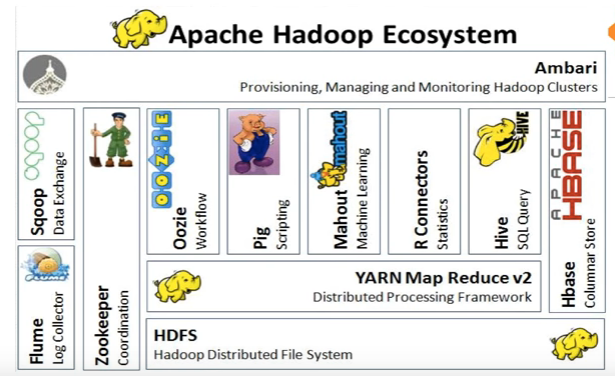 |
| HADOOP ECO SYSTEM |
More detailed refer : https://www.youtube.com/watch?v=1WY63n2XRLM&list=PLBk6njDje9VvahPJMFbC4uK_CWXKcVoKY&index=1
More training Material refer the link : http://www.kalyanhadooptraining.com/
Subscribe to:
Posts (Atom)
-
 1. Download XAMP and install as per your system configuration Link https://www.apachefriends.org/download.html 2. Editor for cake...
-
VI EDITOR Move move in the editor: h right j up k down l left move top shift +g gg down the line of the file :8 go to line 8 search /string...
-
 TabNine TabNine is an artificial intelligence (AI) code completion application that employs deep learning methods to intelligently finish co...